What Is PostgreSQL? A 10-Minute Beginner Guide
What is PostgreSQL—in about ten minutes, with no prior DBA experience required. This guide matches the title and cover’s beginner promise: why teams pick Postgres for web and analytics workloads, how tables, rows, and columns fit together, a short readable SELECT example, and what to open next in the official docs so they feel approachable instead of overwhelming.
If you are new to databases, that is fine. This single article helps you see the big picture of PostgreSQL.
Table of contents
- What is a database?
- What is PostgreSQL?
- PostgreSQL history at a glance
- Why use PostgreSQL?
- Comparing databases
- Core ideas — tables, rows, columns
- A taste of basic SQL
- Installing PostgreSQL
- First steps — hands-on example
- What to study next
1. What is a database?
A database is, in simple terms, a structured place to store data.
Think of a spreadsheet: rows and columns where you stash information and look things up quickly. A database works on a similar idea, but it is built to be much faster and safer at large scale.
- Store — keep members, orders, posts, and so on in an organized way
- Search — find what you need even when there are millions of rows
- Update / delete — change or remove data reliably
2. What is PostgreSQL?
PostgreSQL (often shortened to Postgres) is an open-source relational database management system (RDBMS).
Relational means you store data in tables and you can define relationships between those tables.
It is free to use yet offers features many teams expect from enterprise databases, so it shows up everywhere from startups to large companies.
3. PostgreSQL history at a glance
| Year | Milestone |
|---|---|
| 1986 | POSTGRES project starts at UC Berkeley |
| 1996 | SQL support and naming evolve (via Postgres95 and related steps toward today’s PostgreSQL) |
| 2000s | Fast growth driven by the open-source community |
| Today | Among the most widely used open-source databases |
4. Why use PostgreSQL?
Free and open source
No license fee for typical use, and you can use it commercially under its license.
Strong standard SQL
PostgreSQL tracks SQL standards closely, so what you learn transfers well to other databases.
Extensibility
Beyond built-in types like JSON and arrays, you can add capabilities through extensions. Geospatial work often uses PostGIS.
Reliability
ACID transactions help you reason about consistency and safety. For concepts and syntax, see the official transaction tutorial.
Active community
Documentation, tutorials, and community answers are easy to find.
5. Comparing databases
| Topic | PostgreSQL | MySQL | SQLite |
|---|---|---|---|
| Open source | Yes | Yes | Yes |
| Advanced SQL | Strong | Good | Basic |
| JSON | Strong | Partial | Limited |
| Large workloads | Excellent | Very good | Small / embedded |
| Learning curve | Medium | Easier | Easiest |
| Typical uses | Web, analytics, enterprise | Web | Mobile, embedded |
These are broad tendencies; real behavior depends on versions and how you run them.
6. Core ideas — tables, rows, columns
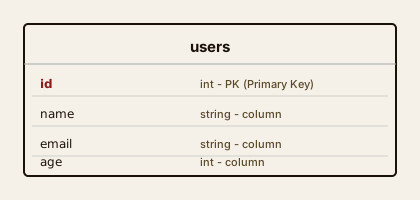
In PostgreSQL, data lives in tables.
[ users table ]

id  | name   | email               | age
----|--------|---------------------|----
 1  | Alice  | alice@example.com   | 28
 2  | Bob    | bob@example.com     | 34
 3  | Carol  | carol@example.com   | 22
- Table — the whole grid
- Row — one record (e.g. one user)
- Column — a field (e.g. name, email)
- Primary key — a value that uniquely identifies a row (often
id)
7. A taste of basic SQL
You work with PostgreSQL using SQL (Structured Query Language).
Reading data (SELECT)
-- all rows in users
SELECT * FROM users;

-- only name and email
SELECT name, email FROM users;

-- age 30 or older
SELECT * FROM users WHERE age >= 30;
Inserting rows (INSERT)
INSERT INTO users (name, email, age)
VALUES ('Dan', 'dan@example.com', 25);
Updating rows (UPDATE)
UPDATE users
SET age = 29
WHERE name = 'Alice';
Deleting rows (DELETE)
DELETE FROM users
WHERE id = 3;
8. Installing PostgreSQL
macOS
brew install postgresql@16
brew services start postgresql@16
Windows
- Download the installer from PostgreSQL for Windows.
- Run the wizard with mostly default options.
- Installers from EDB (and similar) often offer pgAdmin as an optional add-on—not always selected by default.
Linux (Ubuntu / Debian)
sudo apt update
sudo apt install postgresql postgresql-contrib
sudo systemctl start postgresql
Distro packages can lag behind the latest major version. For newer releases, follow PostgreSQL downloads for Ubuntu / PGDG.
Check the install
psql --version
# e.g. psql (PostgreSQL) 16.x
9. First steps — hands-on example
Create a database and table
CREATE DATABASE myapp;

CREATE TABLE users (
    id    SERIAL PRIMARY KEY,
    name  VARCHAR(50) NOT NULL,
    email VARCHAR(100) UNIQUE NOT NULL,
    age   INT,
    created_at TIMESTAMP DEFAULT NOW()
);

INSERT INTO users (name, email, age)
VALUES
    ('Alice', 'alice@example.com', 28),
    ('Bob', 'bob@example.com', 34);

SELECT * FROM users;
Tip:
SERIALbuilds an auto-incrementing integeridso you do not assign it by hand. Since PostgreSQL 10, many teams also prefer standard SQLGENERATED { ALWAYS | BY DEFAULT } AS IDENTITY. See the docs on numeric types and SERIAL.
10. What to study next
Official docs
- PostgreSQL documentation — the authoritative reference (the
currentversion is a good default)
Practice sites
- pgExercises — SQL in the browser
- SQLZoo — interactive tutorials
GUI tools
- pgAdmin — official GUI
- DBeaver — free multi-database client
- TablePlus — polished UI (paid / free tiers)
Concepts to tackle next
- JOIN — combine tables
- Index — speed up lookups
- Transaction — safer reads and writes
- View — save recurring queries
References (official)
Sources used when checking technical claims in this article.
- What is PostgreSQL?
- A Brief History of PostgreSQL
- Data types
- Transactions
- Numeric types / SERIAL
- macOS downloads
- Windows downloads
- Linux (Ubuntu)
I hope this guide is a useful first step into PostgreSQL. When you get stuck, pair the official docs with community threads—you will rarely be the first person to hit that question.